
Elements
(Dynamic)
Dynamic elements automatically pull content in from other places (like a feed of blog posts).
In many cases, you can use CSS classes like .bg-dark, .larger or .invert to quickly modify the appearance of many of these sections. To learn more about available classes, visit your Style Guide.
Looking for more elements?
Visit your static elements library.
⚡️ Quick Tip
How to use classes in the page builder
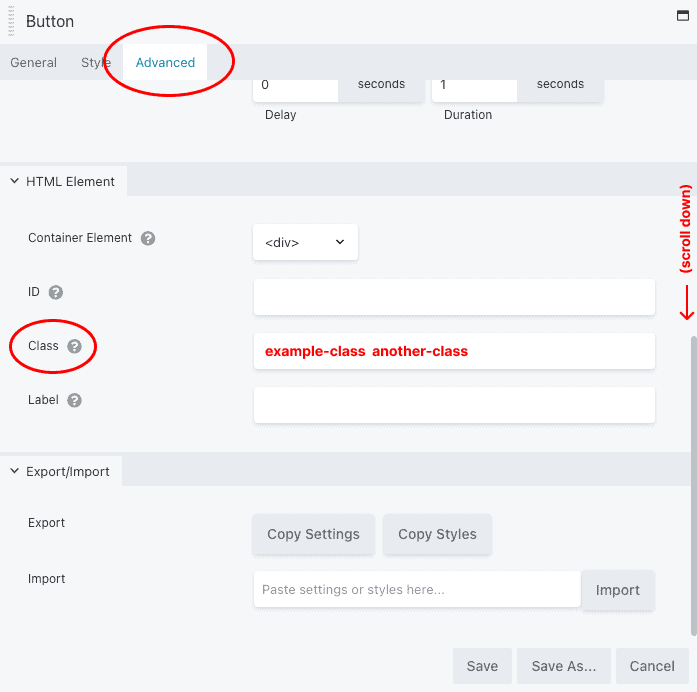
All page builder elements, from rows, to columns, to modules, allow you to assign custom CSS classes to manipulate their appearance in a predefined way. We have indicated when this is the case with any of the elements below.
To assign a class to an element:
- Open the Row, Column, or Module settings.
- Click the "Advanced" tab.
- Scroll to the bottom.
- Enter your desired class in the "Classes" field. (To add multiple classes, separate them with a space.)
- Hit "Save"
Bonus: You can add the class invert to any element to create inverted text (like this!)
Featured
Dynamic - Featured Event
Tip: Use this as a base for creating your own feed item layouts. This one is useful for meta-heavy results.

Dynamic - Featured Course
Tip: Use this as a base for creating your own feed item layouts. This one is useful for meta-heavy results.
Dynamic - Featured Course - Inverted
Tip: Use this as a base for creating your own feed item layouts. This one is useful for meta-heavy results.
Dynamic - Featured Post
Tip: Use this as a base for creating your own feed item layouts. This one is useful for meta-heavy results.

Dynamic - Featured Post - Inverted
Tip: Use this as a base for creating your own feed item layouts. This one is useful for meta-heavy results.
Feeds
Dynamic - Feed - Events
Tip: Use this as a base for creating your own layouts. The partial is already prepped.
Dynamic - Feed - Courses
Tip: Use this as a base for creating your own layouts. The partial is already prepped.
Dynamic - Feed - Courses - Inverted
Tip: Use this as a base for creating your own layouts. The partial is already prepped.
Dynamic - Feed - Posts
Tip: Use this as a base for creating your own layouts. The partial is already prepped.
Dynamic - Feed - Posts - Inverted
Tip: Use this as a base for creating your own layouts. The partial is already prepped.
Dynamic - Feed - People
Tip: Use this as a base for creating your own layouts. The partial is already prepped.


Dynamic - Feed - People - Inverted
Tip: Use this as a base for creating your own layouts. The partial is already prepped.